Showing posts with label Google. Show all posts

6 ways to increase your Google search ranking

Posted on 03:33 In: ,
One of the main marketing strategies that can help online retailers build a successful Internet business is search engine optimization (SEO), the process of tailoring your website to the algorithms that search engines use to rank websites based on “signals” that the site emits.

However, search engine algorithms continue to change with time as the Web evolves (Panda Updates, anyone?), so online retailers need to evolve with the engines. We must make sure we keep up to date with best practices to claim the best possible rankings for relevant keywords.
If you want your website to rank well in 2012, here are 6 components of SEO that online retailers should know about when optimizing their e-commerce website to rank well in top search engines:

1. Keywords. Keyword research is the first step to a successful SEO strategy. Those successful with SEO understand what people are searching for in a search engine. These are the keywords they use to drive targeted traffic to their products. Start brainstorming potential keywords, and see how the competition looks by using Google AdWords Keyword Tool. If you notice that some keywords are too competitive in your niche, go with long-tail keywords (between two and five words) which will be easier for you to rank. The longer the keyword, the less competition you will have for that phrase in the engines.

2. Meta tags. Meta tags still play a vital role in SEO. If you type any keyword into a search engine, you’ll see how that keyword is reflected in the title for that page. Google looks at your page title as a signal of relevance for that keyword. The same holds true for the description of that page. (Don’t worry about the keyword title tag—Google has publicly said that it doesn’t pay attention to that tag, since it has been abused by webmasters and all those trying to rank for certain keywords.)

3. Content. It’s true, content is king. Search engines have stated that creating quality content is the best way to not only rank for keywords, but also create positive user experiences. It will also go a long way with making sure you’re educating your consumer, and being an authority in your niche will leads to boosts in sales.

4. Backlinks. If content is king, then backlinks are queen. Remember, it’s not about which site has the most links, but who has the most quality links pointing back to their website. Build backlinks by submitting monthly or bi-monthly press releases on any exciting company, and contacting popular blogs in your niche to see how you can work together to get a backlink from their website. Create the best possible product site you can, so people talking about the products you sell will link back. Try creating graphics or newsworthy content that will influence bloggers and news websites to link that content.

5. Social media. The algorithms have truly changed since social media first emerged. Many content websites are community-oriented—Digg began allowing users to vote which stories make the front page, and YouTube factors views and user ratings into their front page rankings. Therefore, e-commerce stores must establish a strong social media presence on sites like Facebook, Pinterest, Twitter, etc. These social media sites send search engines signals of influence and authority.

6. Product images. If you think images don’t play a role, think again. When many consumers search for products in the search engines, not only are they looking at the “Web” results, but they’re also looking at the “images” results. If you have quality images of that product on your site—and the files’ names contain relevant keywords—these images will rank well in search engines. This avenue will drive a lot of traffic to your site, as potential customers will click on that image to find your store.

In addition to optimizing these six areas of your site, analyze your competitors and see what they are doing in terms of on-page optimization, off-page optimization (competitive link analysis) and social media. While you may be doing a lot of the same things they are, it’s incredibly important to think outside the box to get a leg up over the competition.

Source : 6 ways to increase your Google search ranking
Social Media

17 Ways to Get De-indexed by Google

Posted on 05:42 In: ,

Imagine this: In a blink of an eye your website vanishes from Google. Trying every variation of your domain name in the search box — but nothing. You, my friend, have been de-indexed from Google.
De-indexed by Google
That’s a tragic place to be in. All your hard work gone up in smoke, you are effectively invisible to everyone in the world now. This is exactly the spot that iAcquire found themselves in May 2012 when they were caught up in the Dun and Bradstreet link buying scandal. JC Penny, Forbes, and Overstock also found themselves in a similar position (being penalized for link buying, but not necessarily flushed from Google’s index).
Never mind whether or not you agree with Google’s rules, and the punishment meted out, Google’s rules are the ones everyone has to play by. These rules, and the penalties, should not really surprise anyone. And no one should need to have described how crucial search is to a business’ success online either. Although social recommendations are catching up, search remains the number one way to drive traffic a website. All this is common knowledge, I only reiterate to hammer home how crucial it is to have a healthy relationship with search engines.
Now that we’re focused on the horror of “de-indexing”, unnatural link acquisition isn’t the only way to get banned by Google. There are actually quite a few more. If you are new to SEO, let this be a warning. If you are a seasoned SEO, let this be a reminder—or a crib sheet you can forward to anyone who is suggesting you do WHATEVER it takes to rank them. Here’s a list of absolute “don’ts” where ranking is concerned.

1. Cloaking

The cloaking process works like this: You show search engines one thing and your visitors something else. The most obvious example would be a site promoting kayaking in the search results, but sending the searcher to a pornographic page. Or one selling Viagra. Or some shady off-shore tax scheme.
Cloaking is accomplished by delivering content based upon the IP address or the User-Agent HTTP. If a search spider is detected, then a server-side script delivers the kayak version of the page. If a user is detected, then the pornographic content is served.
This practice is deceptive—and flat-out forbidden by Google.

2. Duplicate Content

Black hat SEOs will try to boost page views by creating multiple pages of the same content. This is a pretty straightforward tactic, but is equally condemned by Google. Spammy sites and repeat offenders will more than likely get canned from Google—or at least dropped to the bottom of the barrel in search rankings.
Here’s the thing: You can inadvertently create duplicate content on your website through category, tag, and archive pages. This won’t get you banned from Google, but it could get you penalized.
And what about people stealing your content? Notify Google.

3. Writing Content with a Machine

As you can probably guess, black hat SEOs are lazy, and this vice is seen most clearly in the tactic of getting machines to create content.
Sometimes this is generated from scratch, but more often than not, this content is created by scraping already existing content, modifying the document, and then re-publishing.
The motto in this example is “I’m not going to waste my time creating content when I can borrow someone else’s and make it mine.” Google will punish this.

4. Add Unrelated Keywords to Your Content

Keywords aren’t what they used to be in the search marketing game, so you don’t see a lot of keyword stuffing anymore. But that doesn’t mean Google won’t punish this practice. You see, some SEOs still recommend this.
Never list keywords that don’t relate to your site, repeat a keyword that does relate to your site dozens of time, and embed brand name (trademarked no less) and competitor name keywords. This may not only get you banned, but it could get you a lawsuit.

5. Joining Link Exchanges and Bad Neighborhoods

Online etiquette says that if someone links to you that you should link back to them. Well, that’s debatable.
Google will judge your external links just as closely as they will evaluate the incoming links to your site — and they will evaluate the quality of those sites sending and getting links from you. Linking out to low-quality sites can damage your reputation and lower your Page Rank. Trade in paid links and you will get banned. Just ask iAcquire.

6. Font Matching


Another old-school black hat tactic is to plaster keywords on a site in the same color as the background, inevitably hiding those keywords.
It’s laughable how easy this is for Google or anyone to spot (the keywords show up in the code as text—as does every other element of a webpage—no matter what color the font). What’s not so funny is the penalty; you could get dumped from Google.

7. Microscopic Font

Another variation of keyword stuffing is to place keywords at the bottom of a webpage in font so small that it’s incomprehensible to the naked eye.
Again, Google can de-index a site for this (no matter the size of the font search spiders still read the same code) for trying to game the system.

8. Stacking Titles

You have to give it to the old school black hat SEOs. They are a creative bunch. Title <title> stacking means nothing more than writing more than one headline for a page—stuffing keywords into those titles. You’ll get no love from Google on this.
If you want to optimize your headlines with keywords, then front-load the headline with those critical words … and take full advantage of all 70 characters.

9. Doorway Pages

This is a tricky one because doorway pages are in the end landing pages optimized for one keyword. The difference between a legitimate keyword optimized landing page and one that Google will pooh-pooh is that the legitimate page provides original content.
For example, bloggers will often create a hub page for a series of articles they did on a particular topic, like “content marketing” or “social media metrics.” They’ll provide an introduction (unique and useful) and then links to those pages in the series.
A spammy doorway page optimized for “content marketing” will not provide original content (and probably employ one of the black hat tactics above) and will not send you to useful content—more likely an ad to buy Viagra from some offshore pornographic studio.
Spammy doorway pages can get you banned. And this is why you need to be careful if you are using landing pages for affiliate links.

10. Point 100 URLs to One URL

Because keyword-rich, exact match domains are still a strong indicator of a site’s content, people want to abuse this by buying every single domain available—plurals, misspellings, adjectives, location, and loaded with keywords. Just think used-clean-cars-sale-city.com.
Next, they point all of these URLs to one domain because, they figure, 100 hits a day to 500 different websites is 50,000 hits a day. Makes sense, right?
That would be super cool if it worked out that way, but it doesn’t What happens is, these sites aren’t indexed except the one—and it may not be your main domain. Busted.

11. Abusing Rich Snippets Markup


Google automatically generates the rich snippets you see on search results these days, but that doesn’t mean they won’t intervene by disabling rich snippets for a certain site if they detect abuse or deception—like marking up invisible content or deceptive content.
Rich snippets can be gamed by creating fake reviews or, like the cloaking tactic, show Google one thing and deliver something completely different to the user (like cheap Viagra through an offshore pornographic site). This destroys user experience and will bring Google’s wrath down on you.

12. Sending Automated Queries to Google

Remember WebPosition Gold—the software tool that automatically tested a keyword’s organic popularity using Google’s SOAP API?
If you’re new to SEO, then probably not, because back in late 2006 Google changed its webmaster guidelines and killed WPG:
“As of December 5, 2006, we are no longer issuing new API keys for the SOAP Search API. Developers with existing SOAP Search API keys will not be affected.”
Here’s the deal: Google hates automated queries. Why? In their own words:
Sending automated queries consumes resources and includes using any software (such as WebPosition Gold) to send automated queries to Google to determine how a website or webpage ranks in Google search results for various queries. In addition to rank checking, other types of automated access to Google without permission are also a violation of our Webmaster Guidelines and Terms of Service.
Violate that and you get penalized. The consequences vary.

13. Building Water-thin Affiliate Sites

Making money selling other people’s products is a viable way to make a living. This is why online affiliate programs are pure gold for people who want a passive income.
But if your website is nothing but a warehouse for other people’s products (Read: You are not creating original content, but, worse, simply scraping product descriptions from the producers) and you’ve adopted a paper-thin template, then Google won’t tolerate you.
Mess with the user experience and you make an enemy of Google.
To get around this professional affiliate, marketers need to invest time and energy in providing useful and relevant content, as well as building sites with safe and secure themes and long-term hosting signals.

14. Scraping Content


Black hat SEO is really short-cut SEO. It’s the lazy man’s way to high rankings. These SEO tactics trade in short-term gains at the expense of long-term success. This is equally true for scarping content, scraping content is not something that the average person will do because most of us are programmed to know that taking something that isn’t ours is wrong.
But there are some fine lines on the Web. I’ve run into people who thought it was okay to copy and paste an article to their website—as longs as they left attribution (without the link). Sometimes they did link, but still grabbed the entire article. Still others publish a portion, but even this can spell trouble with Google.
The bottom line is this: “Are you producing original content?” This is where curators can get in trouble, too, if they aren’t adding value above and beyond the original site holder.

15. Sneaky Redirects

The adjective in the title of this section is a dead giveaway: “Sneaky.” That means there are some legal redirects, the 301 being the most common—sending a visitor to a different URL than the one requested. The most common example is when you are moving a site from mydomain.com to myrockstardomain.com.
So, what differentiates an honest redirect from a sneaky one? Well, when you are trying to be deceptive. You’ll break WNT laws if you use some type of technology like meta refresh or JavaScript to shift the direction a searcher is travelling—in other words, when you toy with the user experience. What happens is the googlebots will index the original URL, but not the redirect.
Of course you can use JavaScript legitimately to redirect people, like in the case of moving users to an internal page once they are logged in, or even, as a hack, to redirect your site after moving it if you don’t have access to the server (not your best choice, though).

16. Duplicate Sites

By now you should know that this is dead ringer for a Google Webmaster Guidelines violation. You should be saying to yourself, “Google rewards those who contribute value to the Web and user experience.” Google punishes lazy webmasters.
People who create duplicate sites are usually trying to outrank the original site. This might be an affiliate who wants to rank above the company he or she is promoting. And because it’s not a unique site with unique content, it gets canned.

17. Interlinking

Some SEOs might argue that this is grey hat: You know … it’s a method that exists in the grey area of SEO tactics — not necessarily black, but not necessarily white. Regardless, Google will punish you if you are guilty of interlinking.
What is interlinking? It’s basically a scheme that takes advantage of the importance of inbound links in search engine ranking by building dozens of sites, and then linking to each other.
This is a tough scheme to detect by either Googlebot or users—unless someone delves into some serious sleuthing or notices that a handful of similar sites dominate the search engines in the search listings. If caught all the sites could get de-indexed.

Conclusion

You might consider yourself a true white hat SEO guru, but falling into using one of these schemes (or some slight variation of them) can ruin anyone’s reputation. If you get a message in your WMT inbox indicating that there are serious problems with your site, the wages of SEO sin can come back to haunt.
If you are reading this, let’s say you do wake up one morning and find yours or your client’s site gone from Google. Sure you can appeal and recover — like iAcquire did, but there has to be some serious boot-licking and website code overhauling going on. What risk it? I hope this has helped.

Source : 17 Ways to Get De-indexed by Google

Google has been constantly changing its algorithm to continuously provide reliable information to people. Most internet marketers have been frustrated with the ever-changing algorithms of Google and have given up. Most of them also tried some SEO techniques that others have thought to be long dead like web 2.0 postings, profile links and article directory submission. The truth is there are only few factors that determine the ranking of a website in Google and here are the six critical ranking signals that I think describe them the most.

  • Age or Time


The age of a domain or the amount of time that the site is live is one of the ranking signals. Google gives priority to those sites that has been continuously providing high information for some quite time. Meaning, the older your site is the better but having an older site does not necessarily means you will rank first, it’s just one of the things your site should have.

  • Users or Visitors


Another ranking signal is your site’s visitors or users. The more people are coming to your site in search for more information, the more Google views your site as an important site that deserve to be ranked. Most people will use automated methods just to drive traffic to their sites, this is not advisable since Google can easily detect if the visitors are legit or just coming from software or a robot.

  • On-Page SEO

How your site is optimized also determines its ranking. Over optimized sites and less optimized sites usually falls in the bottom place. Doing some On-Page SEO can either make or break your site’s ranking. Make sure your site is optimized enough to rank and not too much to lose your rank.

  • Keywords

Finding the right keyword will give you a chance to be on top despite how many competitors you have. Just be sure to diversify your keywords since Google now looks into how diverse your keywords are. Instead of using the keyword “Ranking Signals” as your anchor text or main keyword, you should also consider using some other semantic keywords like “Ranking Factors”, “Ranking Signs” and “Ranking Basis”.

  • Social Media

Social media are playing an important role in determining the ranking of your site. Social media is now being used as a form of SEO especially in disseminating information that can be found on your site. In Google’s point of view, websites that receive a lot of social media attention is important and therefore should be ranked higher. Too much social media to your site can get your site flagged by Google as a spam site. Exercise extreme caution when using social media as a form of SEO.

  • Backlinks

Another key factor in determining a site’s ranking is backlinks. Backlinks can easily be created with profile links, article directories, web 2.0 sites, social bookmarking and site directories. Though it is very easy to create backlinks, it is quite difficult to find a high quality and relevant backlink. Based on the recent Google updates (especially Penguin), Google now wants high quality and relevant backlinks rather than volume. Sites that have 100 backlinks to their sites might be ranked lower than a site that has 20 high quality and relevant backlinks.

Though there are six ranking signals that Google is looking for, an excess or lack of one of the signals can affect your site’s ranking. Just make sure to balance all of the six signals and you will be seeing your site rank as number one on Google.

Ranking your site can be quite hard without the proper SEO techniques. Keep in mind that SEO unlike the previous years is harder than ever. You must work hard to achieve great ranking.

Source : http://www.business2community.com


It's no secret. When engineers built Google+, they constructed an SEO juggernaut to dominate search results above all other social platforms. Although Facebook and Twitter are essential to marketing efforts, both restrict Google from accessing much of their data. This limits their SEO effectiveness.
Not so with Google+.

Here’s an experiment: If you use Google+, perform a search for your name and check the domain distribution of first 100 results. The graph below shows what happens when searching my own name.
Google+ SEO Dominance
Even though I use Twitter and Facebook far more often, Google+ dominates the search results. Google+ even beats SEOmoz and my own blog. Multiply this for 100's of millions of people, and you can begin to comprehend the scope of Google's platform.

Fortunately, there are several ways to take advantage of this SEO domination for your own benefit.

1. Follow your profile links

Consider this: at SEOmoz you must earn 200 Mozpoints before earning a followed profile link (submit good comments!) On the other hand, Google+ not only allows you to link to your other profiles across the web, but you can embed followed links directly into your bio with the anchor text of your choice.
The value of a link from Google+ is, in theory, like any other. It depends on the authority of both the page and domain. My own profile shows the following metrics:
  • MozRank: 1.91
  • PageAuthority: 49
  • PageRank: 3
If you can raise your visibility by getting more people to engage with you, share your posts, or link directly to your profile, the more valuable your profile links become.

2. Embed post links

Like profile links, Google+ also allows you to insert followed links directly into your posts – as many as you want. Simply insert the full URL and Google will automatically format it as a link.

The value of these links increases the number of times the post is shared, linked to and +1’ed.
For example, check out this one sentence post from Alexia Tsotsis, which has a PageRank of 3 and is cached by Google every couple of weeks. (Even though PageRank is not highly correlated with rankings, for Google+ it’s often the only metric available.)
Followed Post Links
If your post goes viral or is reshared by high-authority profiles, the value of those links increases.

3. Optimize your G+ title tags

The first sentence of your Google+ post becomes part of the title tag, which is highly correlated with rankings and greatly influences click-through rates. Choose your keywords carefully and consider that the first sentence will be the first thing most people see.
Check out how this simple post from Danny Sullivan ranks for its title.

Danny Sullivan Google+
A widely shared post with a good title has an excellent chance of ranking for its given keywords.

4. Unlimited editing power

Edit this postGoogle+ is just like your own mini personal blogging platform. This means you can fully edit any of your posts at any time. Not so with Facebook or Twitter. Facebook gives you only limited editing abilities. Twitter, after you tweet, only lets you delete.
This is important if your Google+ post goes viral and you want to make updates or changes. If need be, you can also update the title tag and any attached media as well.
You may not own the platform, but Google+ gives you a broad amount of control over your own content.

5. Index new content lightning fast

If you share new content on Google+, chances are that Google will index the page very quickly.
Rumor has it that new URLs are crawled almost instantly. This makes complete sense as part of the purpose of Google+ was to replace Twitter when creating Google's Realtime Search.
In the old days, if you wanted a website indexed you filled out a webform and waited several weeks. Today, it's as simple as pressing a +1 button.
“Google+ is the new Google Submit URL box.”
- Rand Fishkin, GROW 2012 Source
Share your new content on Google+, as well as your other social networks, for quick indexation.

6. Stalk Connect with influencers

Google+ lists 17 different notification triggers that can help you connect with influencers in your industry.
Depending on the individual's account settings, these notifications can take the form of an email, phone SMS, or the omnipresent red Google notification bar.

Google+ Notifications
17 actions that trigger notifications:
  1. Mention them in a post 
  2. Share a post with them directly 
  3. Share a post and you're in a circle they subscribe to 
  4. Comment on a post they created 
  5. Comment on a post after they comment on it 
  6. Add them to a circle 
  7. Suggest new people to add to their circles 
  8. Tag them in a photo 
  9. Tag one of their photos 
  10. Suggest a profile photo for them
  11. Comment on a photo after they comment on it 
  12. Comment on a photo they are tagged in 
  13. Comment on a photo they tagged 
  14. Start a conversation with them
  15. Send them an invitation or update an event
  16. Remind them about events
  17. Any activity on events they created 
Several folks have introduced themselves to me on Google+ by "gently" using the methods above.
Be warned: the few who crossed the line into spamminess have been banned from several inboxes forever.

7. Optimize your author pic for more traffic

Last spring, I performed a series of tests with my Google+ author photo that led to an increase in the click-though rate for my websites.
Google+ Profile Photos
If you successfully implement the author tag and have a catchy photo, it often doesn't matter if you rank 2nd, 3rd or even 4th. With an eye-catching pic you can often grab free traffic away from even your competitor's #1 ranking.

8. Test drive a G+ social media dashboard

Google Analytics has progressed greatly with social media reporting, but if you live and die by social traffic you want to bring the information front and center.

Adam Singer created an awesome social media dashboard that you can use for free. At one glance you can view all your essential metrics from Google+ traffic and all other social networks including:
  • On Site Social Actions, i.e. Google +1's
  • Revenue per Visit by Social Network
  • Overall Traffic Stats by Social Source
Bonus: Install this dashboard for free in your Google Analytics account by clicking here.

Social Media Dashboard

9. Check your CircleRank

My favorite new tool is CircleCount. Try it now by pasting in your Google+ URL to chart your daily follower growth, the virality of your posts, and even see your "CircleRank" score compared against all other Google+ profiles.

Circle Rank
CircleRanks of note:
The election is over. Brittany won.

10. Be an awesome (Late) early adopter

Even with it's explosive growth, only 1 in 4 people use Google+ once a month. The rest log in even less, although this number is growing fast.

None of these tips matter unless you actually use Google+. Out of the 400 folks I've circled in my Google+, only about 75 actively participate. No surprise, these tend to be the more savvy SEO and media types.
There's still time. Folks are catching on. Yes, early adopters win the day.
You can do Google+ in less than 10 minutes a day. This means creating a few simple habits to fit it into your workflow.
  • Press the +1 button to spread share worthy comment
  • ...  add comments on the truly great stuff
  • Add +1 Buttons on Your Own Content
  • Engage / Comment / Reshare / Start a Hangout / Create an Event
  • Circle Great People
  • Make it Easy for People to Circle You...             


Wondering if some human at Google has reviewed your web site and decided it deserves to be penalized in Google’s search results? Google’s now reporting such cases nearly 100% of the time.
“We’ve actually started to send messages for pretty much every manual action that we do that will directly impact the ranking of your site,” said Matt Cutts, the head of Google’s web spam team, when speaking at the Pubcon conference this week.
“If there’s some manual action taken by the manual web spam team that means your web site is going to rank directly lower in the search results, we’re telling webmasters about pretty much about all of those situations,” he continued.
Cutts said there might be a rare “corner case” that might not make it but that reporting is “practically 100%” and “the intent is to get to 100%, and as far as I know, we’re actually there.”
It’s very similar to what Cutts said when speaking at SMX Advanced this June. Then, he gave a 99% figure. Now, the rounding is up to 100% and is even more noteworthy to highlight.
It’s a good time to review the two types of actions that Google has: manual and algorithmic. Google also refers to them as “actions” rather than penalties, even though for most impacted by these, they’ll feel like a penalty, because they may rank lower, often dramatically so.

Manual Actions

With a manual action, some human being at Google has reviewed a site and decided to issue a penalty against it (usually manual actions are indeed penalties). The review might be triggered by a spam report from an outsider or just Google’s regular policing.
Removing manual penalties often involve the targeted site filing a reconsideration request along with showing a good faith effort to correct a problem. For example, last year, JC Penney was hit with a 90 day penalty for paid links. It made an effort to clean up those links, submitted a reconsideration request and the penalty was eventually removed, deemed “tough and the appropriate length,” as Cutts said last year.
How do you know if you have a manual action? This should be reported to you through Google Webmaster Central, if you’ve verified your site there.

Algorithmic Actions

With an algorithmic action, Google’s assessed what feels like penalty against a site through an automated means. In other words, something with the site is causing Google’s computer algorithms to prevent the site from ranking as high as it could.
“Feels like a penalty?” I know, but Google’s adamant that algorithmic actions aren’t penalties but rather simply part of how Google ranks sites overall. Indeed, Google has a wide variety of factors it uses to determine how well any page should rank. Sites that please the algorithm do well; those that don’t get less visibility. That’s SEO 101.
But for almost two years now, Google’s introduced a number of algorithmic filters or “updates” that have had a noticeable impact on some sites beyond its usual algorithmic tweaks. The names of these updates will be familiar to many:
  • Panda, introduced Feb. 2011 to fight sites with poor quality content
  • Top Heavy, launched in Jan. 2012 to prevent sites “top heavy” with ads from ranking well
  • Penguin, introduced in April 2012 to better combat web spam
  • Pirate, launched in Aug. 2012 to penalize sites with many copyright complaints
  • EMD, introduced in Sept. 2012 to prevent poor quality “exact match domain” sites from ranking well
Sites caught by these filters will feel like they’ve been assessed a penalty. But unlike with manual actions, filing a reconsideration request won’t help. The only appeal is to the algorithm. That means making changes and waiting for the next time one of the filters is updated, to see if the site is no longer caught.
Source :  http://searchengineland.com/google-now-reports-practically-all-manual-actions-136822


After months of anticipation, Google’s Matt Cutts, at PubCon in Las Vegas today, finally announced a new tool in Webmaster Tools to disavow links.
Cutts made comments at SMX Advanced back in July, indicating that a tool would be on the way, and it is now here.
In text on the tool itself, Google says, “If you believe your site’s ranking is being harmed by low-quality links you do not control, you can ask Google not to take them into account when assessing your site.”
Here is Cutts talking about it in a new Webmaster Help video:


“You might have been doing blog spam, comment spam, forum spam, guestbook spam…maybe you paid somebody to write some low quality articles and syndicate those all over the place with some very keyword rich anchor text, and maybe Google sent you a message that says, ‘We’ve seen unnatural links to your site or we’ve taken targeted action on some of the unnatural links to your site,’ and so as a result, you want to clean up those backlinks,” Cutts says in the video.
First and foremost, he says, they recommend getting those links actually removed from the web. Of course, that’s easier said than done.
Google says in a help center article:
PageRank is Google’s opinion of the importance of a page based on the incoming links from other sites. (PageRank is an important signal, but it’s one of more than 200 that we use to determine relevancy.) In general, a link from a site is regarded as a vote for the quality of your site.

Google works very hard to make sure that actions on third-party sites do not negatively affect a website. In some circumstances, incoming links can affect Google’s opinion of a page or site. For example, you or a search engine optimizer (SEO) you’ve hired may have built bad links to your site via paid links or other link schemes that violate our quality guidelines. First and foremost, we recommend that you remove as many spammy or low-quality links from the web as possible.

If you’ve done as much work as you can to remove spammy or low-quality links from the web, and are unable to make further progress on getting the links taken down, you can disavow the remaining links. In other words, you can ask Google not to take certain links into account when assessing your site.
Update: Google has now put out an official blog post about the tool. In that, Webmaster Trends Analyst Jonathan Simon writes:
If you’ve ever been caught up in linkspam, you may have seen a message in Webmaster Tools about “unnatural links” pointing to your site. We send you this message when we see evidence of paid links, link exchanges, or other link schemes that violate our quality guidelines. If you get this message, we recommend that you remove from the web as many spammy or low-quality links to your site as possible. This is the best approach because it addresses the problem at the root. By removing the bad links directly, you’re helping to prevent Google (and other search engines) from taking action again in the future. You’re also helping to protect your site’s image, since people will no longer find spammy links pointing to your site on the web and jump to conclusions about your website or business.
If you’ve done as much as you can to remove the problematic links, and there are still some links you just can’t seem to get down, that’s a good time to visit our new Disavow links page. When you arrive, you’ll first select your site.
According to a liveblogged account of Cutts’ speech, he says not to use the tool unless you’re sure you need to use it. He mentioned that Google, going forward, will be sending out more messages about examples of links Google is distrusting. He also says not to disavow links from your own site.
Regarding those link messages, Cutts says in the video that these are only examples of links, and not a comprehensive list.

The tool consists of a .txt file (disavow.txt), with one URL per line that tells Google to ignore the site. You can also use it to block a whole domain by using a format like: domain:www.example.com.
Cutts apparently suggests that most sites not use the tool, and that it is still in the early stages. Given that link juice is a significant ranking signal for Google it’s easy to see why Google wouldn’t want the tool to be over-used.

It can reportedly take weeks for Google to actually disavow links. In a Q/A session, according to the liveblog from Search Engine Roundtable, Cutts said you should wait 2-3 days before sending a reconsideration request after you submit a disavow file. When asked if it hurts your site when someone disavows links from it, he reportedly said that it typically does not, as they look at your site as a whole.
Danny Sullivan blogs that “Google reserves the right not to use the submissions if it feels there’s a reason not to trust them.”

Users will be able to download the files they submitted, and submit it again later with any changes. According to Sullivan’s account, Cutts said the tool is like using the “nofollow” attribute in that it allows sites to link to others without passing PageRank.

That’s good to know.

A lot of SEOs have been waiting for Google to launch something like this for a long time. Perhaps it will cut down on all of the trouble webmasters have been going through trying to get other sites to remove links. At the same time, we also have to wonder how much overreaction there will be from webmasters who end up telling Google to ignore too many links, and shooting themselves in the foot. This will be a different era, to say the least.

Just be warned. Google’s official word of caution is: ” If used incorrectly, this feature can potentially harm your site’s performance in Google’s search results. We recommend that you disavow backlinks only if you believe you have a considerable number of spammy, artificial, or low-quality links pointing to your site, and if you are confident that the links are causing issues for you. In most cases, Google can assess which links to trust without additional guidance, so most normal or typical sites will not need to use this tool.”
The information Google uses from the tool will be incorporated into its index as it recrawls the web and reprocesses the pages it sees.

Google currently supports one disavow file per site. That file is shared among site owners in Webmaster Tools. The file size limit is 2MB.

Source: webpronews

Google’s security blog announced today several updates on how they have been addressing malware and hacked sites on the internet.
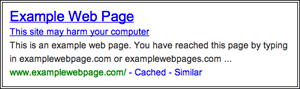
Google said that between 12 and 14 million search queries per day return warnings that at least one of the results listed in the Google search results were compromised. Google has two types of labels for sites that were hacked, either they are listed as compromised or as harmful. The difference is that compromised sites are hacked and the content and links may have changed but they are likely not harmful to the searcher to click on them. The harmful warning is an extended warning that says if you go to the web site, your computer may be infected with malware.
Google finds about 9,500 new malicious websites every day and sends “thousands of notifications daily to webmasters.”
Hacked sites and malware in the search results are serious issue. In fact, USA Today has a story out yesterday named Search results may deliver tainted links. The story quotes a study from Blue Coat Security Lab that says users are four times as likely to be infected by compromised search results when compared to spam emails.
Google also does try to warn and prevent malware and other viruses through their browser, Chrome and through their Safe Browsing API that other browsers and companies can adopt. They even send thousands of notifications daily to Internet Service Providers about these issues.
Since 2009, the number of infected sites – legitimate websites that are compromised so they can deliver or redirect to malware is down. However the number of “attack” web sites – websites that are specifically built to distribute malware is up. Here are some charts from Google:


Source: searchengineland

Google Apps Improves Its Security

Posted on 00:17 In:
Google Apps Improves Its Security
Google announced today that it has implemented two new security features into Google Apps. One enables tighter password verification for businesses, and the other enhances Microsoft Active Directory integration. The announcement came from Rishi Dhand, product manager for Google Apps, in a blog post over at the Official Google Enterprise Blog.
The first security upgrade for Google Apps users is an option to require all users in a domain to use 2-step password verification. Though 2-step verification has been available as an option for individuals using Google Apps, the option to require it allows companies to increase their password security as a whole. From Dhand’s blog post:
Since we launched 2-step verification, we’ve seen millions of users enable it and thousands more do so every day. 2-step verification requires two means of identification to sign in to a Google Apps account: something you know (a password) and something you have (a verification code from your mobile phone). Even if someone has stolen your password, they’ll need more than that to access your account. This additional layer of security greatly reduces the chance of unauthorized access via account hijacking or other means.
The second security upgrade is a password sync feature for Google Apps businesses that use Microsoft Active Directory. Those businesses can now manage their passwords using Active Directory, and then sync the passwords with Google Apps when they are changed. Dhand stated that the passwords would be transmitted both hashed and encrypted during synchronization.
These announcements come at a time when password security is certainly on the minds of companies. Two weeks ago over 6.4 million LinkedIn member passwords were leaked to a hash-cracking website and decoded. Passwords from eHarmony members and Last.fm members were also part of the leak. Though the companies have resolved the situation adequately, the ordeal still shined a spotlight on the need for web services to use enhanced password security.


You Don’t Want a Google Disavow Links Option

Posted on 03:03 In:

Do you really want a disavow links option? I don’t.

With the recent Penguin update, the SEO community has been talking a lot lately about negative SEO and disavowing links. (For the record, negative SEO doesn’t just refer to links, but for this article, let’s assume it does.)
SEOs afraid of getting penalized for “bad links” have been screaming to Google, asking for a way to disavow links that they claim they didn’t create. They say that it’s the only way to regain ranking drops from Penguin, and that it’s necessary to prevent negative SEO. (Note: Simply disavowing links probably won’t help you recover from Penguin. You’ll most likely have to create lots of new links to make up for the ones that used to count.)
I’ve been thinking about it a lot lately, and I’ve come to the conclusion that I don’t want a disavow links option at all.
Sure, it seems like the cure-all solution for negative SEO, the only way to truly prevent somebody else from harming your site with links you don’t control is to add a way to remove them. Or is it?
But what else would a disavow links option add?

It Might Make Spamming Easier.

This is the common argument. If I can instantly tell Google about all my bad links, what’s to stop me from going crazy with ScrapeBox, buying XRumer blasts, and setting up intensive link wheel blog networks? If I get caught, I can claim “It wasn’t me,” disavow the links, and start over.
Maybe others will systematically disavow links in an attempt to better understand the algorithm and how it weighs things. I wouldn’t waste my time there, but I guarantee somebody will do it, and then we’ll all overreact to their anecdotal findings like usual.
But is that the only downside?

Could a disavow links option actually make negative SEO easier?

The Penguin update did a good job of finding bad links (or so we think); however, it didn’t find ALL the bad links out there. I won’t divulge any spam techniques here, but there’s still lots of types of automated link building that still work pretty damn well. Trust me on that.
The assumed way this tool would work is that webmasters would log in and tell Google, “Hey, here’s the URLs of pages that are linking to me that I don’t approve of,” and then Google would factor those out of the algorithm for your site.
But would they do anything else with that data?
See, most sites that are considered spammy by Penguin don’t just include links to one site. They include links to lots of sites. What about those other links?
If I were an engineer at Google, I wouldn’t use the disavow links tool to simply take your word for it. I’d want to make Google’s results better, so I’d use those sites you submit to find other shady links and discredit them, too. In fact, it could even be a neural network signal about spammy sites that could feed back into the main algorithm. Chances are good that a disavow feature would be more than a negative SEO failsafe and that it would actually evolve into another way to train the algorithm.
In their hurry to disavow anything remotely questionable, how many SEOs would shoot themselves in the foot by disavowing links that weren’t hurting them?
My guess? Many will do more harm than good to their sites with such a tool.

But what about all those other links on the pages you disavow?

By disavowing your own links, you’ve also essentially outed countless other webmasters, and isn’t outing frowned upon? If so, then why is everybody demanding Google build what is essentially an automated outing form? I don’t get it.
It doesn’t just stop there though…

Negative SEO could soon involve building links to my own site.

Say what? No, I’m not crazy. Think about it. If Google did, in fact, use the data from the disavow tool, then we could see a radical shift in the idea of negative SEO. Instead of building spammy links to your site, a competitor could theoretically achieve the same result by building links to his own spam site. He’d simply look at your link profile and start building links to his spam site on as many pages that link to you as possible. Then he’d disavow all the links to his spam site, bringing down all your unpenalized links with it. (Note: This could make a great Mechanical Turk or Fiverr job. Another note: That’s just a simple example. This could get way more complicated, too!)
Put simply, I’d much rather prefer there be one Google algorithm trying to find shady links than thousands of SEOs taking it upon themselves. There’s just too many ways we could screw it up.
Is this really what we want? A feature that would lessen the consequences of spamming, provide SEOs an automated way of outing other SEOs, AND introduce a new form of negative SEO that we haven’t even thought of yet?
I don’t want that. I don’t want that at all.

Source: searchenginejournal

It seems that Google’s decision to replace its star rating system with Zagat scores for local search results isn’t a huge hit with some businesses.


Last month, Google revealed what appears to be the primary reason it acquired Zagat, when it announced Google+ Local, effectively replacing Google Places with Google+ infused local results and Zagat scores.
“Each place you see in Google+ Local will now be scored using Zagat’s 30-point scale, which tells you all about the various aspects of a place so you can make the best decisions,” Google explained, when Google+ Local was announced. “For example, a restaurant that has great food but not great decor might be 4 stars, but with Zagat you’d see a 26 in Food and an 8 in Decor, and know that it might not be the best place for date night.”
Some businesses claim to be losing traffic because Google replaced its ratings system with Zagat’s scoring system. Barry Schwartz at Search Engine Roundtable points to an interesting thread in the Google Product Forums.

There, Dr. Rodney McKay writes, “I know for a fact that I am not the only one that feels this way as I have talked to others who have also experienced the same problem. Everything about Google+ seems to be fine if not better than Google Places except for the removal of the stars. Ever since they removed the star ratings, my actions or clicks went from 30 – 60 or more a day to 0 – 5. I am still on the first page of Google for relevant search terms and in most cases I am also the first listing, I am also receiving the same amount of impressions as before, but the absence of the stars has caused an obvious hit on my Google Business Listing effectiveness. Injunction with that, I have seen a drastic decline in business. Is there not a way to compromise and use the Zagat reviews as well as the stars?”

Some have suggested that Zagat scores are more suited to restaurants, and aren’t so great for other kinds of businesses. There’s no question that Zagat has historically been restaurant-focused. Even now, if you go to Zagat.com, it’s all about restaurants. The welcome message says:

ZAGAT.com, the world’s original provider of user-generated content, provides trusted and accurate restaurant ratings and curated restaurant reviews for thousands of top restaurants worldwide. Our robust restaurant search and rich free features help diners easily find the best restaurant for every occasion, every time – from New York to Los Angeles, London to Tokyo, Paris to Beijing and everywhere in between; from the most elegant restaurants for fine dining to casual, inexpensive spots for family meals, you’ll find it all on ZAGAT.com.
Yet Google has thrust the Zagat system across the much broader local business search space. I don’t see why the system couldn’t actually help some businesses, as Zagat is a pretty well known restaurant guide. However, it might be less helpful in other industries. Currently, you can search for shoe stores, for example, and still get the new scoring system, rather than the starred reviews:
John's run walk shop
It’s a somewhat confusing system, given the food element of Zagat. When you click to “learn more about our scores and reviews,” Google explains that you may see scores depicted in one of two ways: “Scores with multiple aspects” or “Overall scores”.
Multiple Aspects
overall scores
As we see in the case of the shoe store above, Google shows the overall. That way it doesn’t have to show the “food” element.
“When we don’t have enough user ratings on different aspects, we will just show an overall score,” Google explains. “An overall score is comparable to a score in the primary aspect for a location, like food for restaurants.”
Perhaps the system will get better in time for more than just restaurants, as it’s used more.
The new system is definitely much broader than the previous star system, given its larger scale. 17 out of 30 doesn’t sound incredibly great but if you look at the scale, 16-20 represents “good to very good”. 0- 30 is pretty wide range to cover the four individual ratings Google goes by:
3 Excellent

2 Very Good

1 Good

0 Poor to Fair
Google takes the average, and multiplies it by ten to come up with averaged scores.
One person comment on Schwartz’s article, “People understand star ratings. Any kind of visual rating (progress bars, stars, thumbs-ups) just works. They don’t understand numbers. And when higher ratings are in red… it’s even worse. Numbers in red usually mean danger. Anything in red means danger unless it’s properly used to grab attention and visibly labeled as a call to action. It’s freaking common sense.”
It would be interesting to know the local SEO effects of Googe’s move to the Zagat system. Survey results released this week indicate that many of the top ranking factors are directly related to reviews. Here are how a few of them ranked, according to that (out of the top 90):
7. Quantity of Native Google Places Reviews (w/text) (REVIEWS)

18. Product/Service Keywords in Reviews (REVIEWS)

24. Quantity of Third-Party Traditional Reviews (REVIEWS)

26. Location Keywords in Reviews (REVIEWS)

31. Velocity of Native Google Places Reviews (REVIEWS)

34. Quantity of Reviews by Authority Reviewers (e.g.Yelp Elite, Multiple Places Reviewers, etc) (REVIEWS)

46. High Numerical Ratings by Authority Reviewers (e.g.Yelp Elite, Multiple Places Reviewers, etc) (REVIEWS)

49. Overall Velocity of Reviews (Native + Third-Party) (REVIEWS)

50. Quantity of Third-Party Unstructured Reviews (REVIEWS)

52. Quantity of Native Google Places Ratings (no text) (REVIEWS)

53. High Numerical Ratings of Place by Google Users (e.g. 4-5) (REVIEWS)

62. Velocity of Third-Party Reviews (REVIEWS)

69. High Numerical Third-Party Ratings (e.g. 4-5) (REVIEWS)

74. Positive Sentiment in Reviews (REVIEWS)

Of course, these are all based on survey responses from before Google announced Google+ Local.

Source: webpronews

We’ve all been waiting for it, and now it’s here: Google’s monthly list of algorithm changes for May. This time, it’s 39 changes (less than last month).

Of particular note, Google says it made a couple of adjustments to Penguin:
Improvements to Penguin. [launch codename "twref2", project codename "Page Quality"] This month we rolled out a couple minor tweaks to improve signals and refresh the data used by the penguin algorithm.
Also noteworthy:
Better application of inorganic backlinks signals. [launch codename "improv-fix", project codename "Page Quality"] We have algorithms in place designed to detect a variety of link schemes, a common spam technique. This change ensures we’re using those signals appropriately in the rest of our ranking.
Of course, Google also made more adjustments to freshness.
We’ll be digging into these much more, but for now, here’s the list in its entirety:
  • Deeper detection of hacked pages. [launch codename "GPGB", project codename "Page Quality"] For some time now Google has been detecting defaced content on hacked pages and presenting a notice on search results reading, “This site may be compromised.” In the past, this algorithm has focused exclusively on homepages, but now we’ve noticed hacking incidents are growing more common on deeper pages on particular sites, so we’re expanding to these deeper pages.
  • Autocomplete predictions used as refinements. [launch codename "Alaska", project codename “Refinements”] When a user types a search she’ll see a number of predictions beneath the search box. After she hits “Enter”, the results page may also include related searches or “refinements”. With this change, we’re beginning to include some especially useful predictions as “Related searches” on the results page.
  • More predictions for Japanese users. [project codename "Autocomplete"] Our usability testing suggests that Japanese users prefer more autocomplete predictions than users in other locales. Because of this, we’ve expanded the number or predictions shown in Japan to as many as eight (when Instant is on).
  • Improvements to autocomplete on Mobile. [launch codename "Lookahead", project codename "Mobile"] We made an improvement to make predictions work faster on mobile networks through more aggressive caching.
  • Fewer arbitrary predictions. [launch codename "Axis5", project codename "Autocomplete"] This launch makes it less likely you’ll see low-quality predictions in autocomplete.
  • Improved IME in autocomplete. [launch codename "ime9", project codename "Translation and Internationalization"] This change improves handling of input method editors (IMEs) in autocomplete, including support for caps lock and better handling of inputs based on user language.
  • New segmenters for Asian languages. [launch codename "BeautifulMind"] Speech segmentation is about finding the boundaries between words or parts of words. We updated the segmenters for three asian languages: Chinese, Japanese, and Korean, to better understand the meaning of text in these languages. We’ll continue to update and improve our algorithm for segmentation.
  • Scoring and infrastructure improvements for Google Books pages in Universal Search.[launch codename “Utgo”, project codename “Indexing”] This launch transitions the billions of pages of scanned books to a unified serving and scoring infrastructure with web search. This is an efficiency, comprehensiveness and quality change that provides significant savings in CPU usage while improving the quality of search results.
  • Unified Soccer feature. [project codename "Answers"] This change unifies the soccer search feature experience across leagues in Spain, England, Germany and Italy, providing scores and scheduling information right on the search result page.
  • Improvements to NBA search feature. [project codename "Answers"] This launch makes it so we’ll more often return relevant NBA scores and information right at the top of your search results. Try searching for [nba playoffs] or [heat games].
  • New Golf search feature. [project codename "Answers"] This change introduces a new search feature for the Professional Golf Association (PGA) and PGA Tour, including information about tour matches and golfers. Try searching for [tiger woods] or [2012 pga schedule].
  • Improvements to ranking for news results. [project codename "News"] This change improves signals we use to rank news content in our main search results. In particular, this change helps you discover news content more quickly than before.
  • Better application of inorganic backlinks signals. [launch codename "improv-fix", project codename "Page Quality"] We have algorithms in place designed to detect a variety of link schemes, a common spam technique. This change ensures we’re using those signals appropriately in the rest of our ranking.
  • Improvements to Penguin. [launch codename "twref2", project codename "Page Quality"] This month we rolled out a couple minor tweaks to improve signals and refresh the data used by the penguin algorithm.
  • Trigger alt title when HTML title is truncated. [launch codename "tomwaits", project codename "Snippets"] We have algorithms designed to present the best possible result titles. This change will show a more succinct title for results where the current title is so long that it gets truncated. We’ll only do this when the new, shorter title is just as accurate as the old one.
  • Efficiency improvements in alternative title generation. [launch codename "TopOfTheRock", project codename "Snippets"] With this change we’ve improved the efficiency of title generation systems, leading to significant savings in cpu usage and a more focused set of titles actually shown in search results.
  • Better demotion of boilerplate anchors in alternate title generation. [launch codename "otisredding", project codename "Snippets"] When presenting titles in search results, we want to avoid boilerplate copy that doesn’t describe the page accurately, such as “Go Back.” This change helps improve titles by avoiding these less useful bits of text.
  • Internationalizing music rich snippets. [launch codename "the kids are disco dancing", project codename "Snippets"] Music rich snippets enable webmasters to mark up their pages so users can more easily discover pages in the search results where you can listen to or preview songs. The feature launched originally on google.com, but this month we enabled music rich snippets for the rest of the world.
  • Music rich snippets on mobile. [project codename "Snippets"] With this change we’ve turned on music rich snippets for mobile devices, making it easier for users to find songs and albums when they’re on the go.
  • Improvement to SafeSearch goes international. [launch codename "GentleWorld", project codename "SafeSearch"] This change internationalizes an algorithm designed to handle results on the borderline between adult and general content.
  • Simplification of term-scoring algorithms. [launch codename "ROLL", project codename "Query Understanding"] This change simplifies some of our code at a minimal cost in quality. This is part of a larger effort to improve code readability.
  • Fading results to white for Google Instant. [project codename "Google Instant"] We made a minor user experience improvement to Google Instant. With this change, we introduced a subtle fade animation when going from a page with results to a page without.
  • Better detection of major new events. [project codename "Freshness"] This change helps ensure that Google can return fresh web results in realtime seconds after a major event occurs.
  • Smoother ranking functions for freshness. [launch codename "flsp", project codename "Freshness"] This change replaces a number of thresholds used for identifying fresh documents with more continuous functions.
  • Better detection of searches looking for fresh content. [launch codename "Pineapples", project codename "Freshness"] This change introduces a brand new classifier to help detect searches that are likely looking for fresh content.
  • Freshness algorithm simplifications. [launch codename “febofu", project codename "Freshness"] This month we rolled out a simplification to our freshness algorithms, which will make it easier to understand bugs and tune signals.
  • Updates to +Pages in right-hand panel. [project codename “Social Search”] We improved our signals for identifying relevant +Pages to show in the right-hand panel.
  • Performance optimizations in our ranking algorithm. [launch codename "DropSmallCFeature"] This launch significantly improves the efficiency of our scoring infrastructure with minimal impact on the quality of our results.
  • Simpler logic for serving results from diverse domains. [launch codename "hc1", project codename "Other Ranking Components"] We have algorithms to help return a diverse set of domains when relevant to the user query. This change simplifies the logic behind those algorithms.
  • Precise location option on tablet. [project codename “Mobile”] For a while you’ve had the option to choose to get personalized search results relevant to your more precise location on mobile. This month we expanded that choice to tablet. You’ll see the link at the bottom of the homepage and a button above local search results.
  • Improvements to local search on tablet. [project codename “Mobile”] Similar to thechanges we released on mobile this month, we also improved local search on tablet as well. Now you can more easily expand a local result to see more details about the place. After tapping the reviews link in local results, you’ll find details such as a map, reviews, menu links, reservation links, open hours and more.
  • Internationalization of “recent” search feature on mobile. [project codename "Mobile"] This month we expanded the “recent” search feature on mobile to new languages and regions.

Google Will Soon Ignore Links You Tell It To

Posted on 21:32 In:
Google’s Matt Cutts gave a keynote “You and A” presentation at SMX Advanced this week, and mentioned that Google is considering offering a tool that would let webmasters disavow certain links.


Matt McGee at SMX sister site Search Engine Land liveblogged the conversation. Here’s his quote of Cutts, which was in response to a question about negative SEO:
The story of this year has been more transparency, but we’re also trying to be better about enforcing our quality guidelines. People have asked questions about negative SEO for a long time. Our guidelines used to say it’s nearly impossible to do that, but there have been cases where that’s happened, so we changed the wording on that part of our guidelines.
Some have suggested that Google could disavow links. Even though we put in a lot of protection against negative SEO, there’s been so much talk about that that we’re talking about being able to enable that, maybe in a month or two or three.


We recently wrote about Google’s wording change regarding negative SEO, which seemed to be an admission from the company that this practice is indeed possible. These words from Cutts seem to be further confirmation.

Rand Fishkin, CEO of SEOmoz, recently issued a challenge to people to show that if you have a strong enough reputation and link profile, you can’t be hurt by negative SEO. That seemed to go pretty well, but not everyone has the reputation of SEOmoz, even if they don’t necessarily have a bad one. Such a tool from Google could go a long way in helping combat negative SEO practices.
As far as people suggesting that Google could disavow links, Search Engine Land editor Barry Schwartz actually had a pretty good article talking about this last month. “The concept is simple,” he wrote. “You go to your link report in Google Webmaster Tools and have an action button that says ‘don’t trust this link’ or something like it. Google will then take that as a signal to not use that link as part of their link graph and ranking algorithm.”

“What I can’t understand is why hasn’t Google released it yet,” he wrote. “It is a great way for Google to do mass spam reporting by webmasters and SEOs without calling it spam reporting. You will have all these webmasters rush after a penalty to call out which links they feel are hurting them. Google can take that data to back up their algorithms to on links they already know are spam but also find new links that they might not have caught.”

He went on to make the point that Google would find more spam this way.
Once Google launches this tool, assuming that it actually does, it will be very interesting to see how the rankings shake out. It should be an indication of just how important links actually are these days.
As you may know, Google has sent out a ton of Webmaster Tools warnings this year, and such a tool would help users take quick “manual action” on links rather than spend a ton of time sending link removal requests to other sites. It might even prevent some lawsuits (and the death of the web as we know it).
According to Cutts, however, not many of the warnings were actually about links.


Back in 2009, Google released Website Translator, a plugin powered by Google Translate, which enabled webmasters to make their site’s content available in 51 languages (now it’s over 60). Google says over a million sites have utilized it to date.
Google has now launched a new feature that lets users customize the translations and make adjustments.
“Once you add the customization meta tag to a webpage, visitors will see your customized translations whenever they translate the page, even when they use the translation feature in Chrome and Google Toolbar,” explains Google Translate product manager Jeff Chin, in a blog post. “They’ll also now be able to ‘suggest a better translation’ when they notice a translation that’s not quite right, and later you can accept and use that suggestion on your site.”
To use the new features, webmasters can simply add the plugin and customization meta tag to their site, translate a page into one language, hover over a translated sentence to display the original text, click on “contribute a better translation,” and click a phrase to choose an automatic, alternative translation. You can also double-click to edit the translation directly.
Google webiste translator
“If you’re signed in, the corrections made on your site will go live right away — the next time a visitor translates a page on your website, they’ll see your correction,” says Chin. “If one of your visitors contributes a better translation, the suggestion will wait until you approve it. You can also invite other editors to make corrections and add translation glossary entries.”
The feature is currently in beta, and Google still considers it experimental, but if you can actually edit the translations yourself, you should have more control over how your text is displayed, which would be an automatic improvement to the plugin.
Here, you can find tools and resources to add translation to your site.

Source : webpronews

As previously reported, Google announced its first Penguin update since the original over Memorial Day weekend. Google’s head of webspam, Matt Cutts, tweeted about it, saying, “Minor weather report: We pushed 1st Penguin algo data refresh an hour ago. Affects <0.1% of English searches."

Have you seen search referrals drop or rise since this update? Let us know in the comments.
The good news, whether you were hit by Penguin the first time or this time, is that you can recover. We’ve now seen that this can happen, and since we know that Google will continue to push data refreshes for Penguin, there should be plenty of chances to do so. Just think about all the Panda refreshes we’ve seen since February 2011.
We recently reported on WPMU, a seemingly quality site with plenty of fans on social media channels, which got hit by the first Penguin update. The site has now made a full recovery.
Here’s what the analytics looked like after Penguin:
WPMU analytics
Here’s what the analytics look like now:
WPMU Analytics
It’s worth noting that Cutts was aware of this site, as James Farmer (the site’s owner) was able to get it brought to his attention, following the initial Penguin update, via an interview with the Sydney Morning Herald. Cutts had provided some examples of the kinds of links that were likely hurting it. This was all discussed in our previous article, but to summarize, WPMU distributes WordPress themes, and a lot of blogs, including spam blogs were using some of them, which included links back to WPMU in the footer.
Ross Hudgens from Full Beaker provided some assistance and advice for Farmer, and blogged about the experience at SEOmoz. He notes that Farmer opted to ask blogs to remove the links, rather than applying nofollow to them, but it was actually an internal change that Farmer was able to make, which ultimately might have had the greatest impact on the recovery. Hudgens writes:
The most perilous piece of WPMU’s link profile came from one site – EDUblogs.org. EDU Blogs is a blogging service for people in the education space, allowing them to easily set up a subdomain blog on EDUblogs for their school-focused site – in a similar fashion to Blogspot, Typepad, or Tumblr, meaning that each subdomain is treated as a unique site in Google’s eyes. Coincidentally, this site is owned by WPMU and Farmer, and every blog on the service leverages WPMU theme packs. Each of these blogs had the “WordPress MU” anchor text in the footer, which meant a high volume of subdomains considered unique by Google all had sitewide “WordPress MU” anchor text. In what might have been a lucky moment for WPMU, this portion of their external link profile was still completely in their control because of WPMU ownership.
In what I believe is the most critical reason why WPMU made a large recovery and also did it faster than almost everyone else, Farmer instantly shut off almost 15,000 ‘iffy’ sitewide, footer LRDs to their profile, dramatically improving their anchor text ratios, sitewide link volume, and more. They were also able to do this early on in the month, quickly after the original update rolled out. A big difference between many people trying to “clean up their profile” and WPMU is time – getting everything down and adjusted properly meant that many people simply did not see recoveries at refresh 1.1 – but that doesn’t mean it won’t happen at all if the effort persists.


Farmer was also able to get one of the blogs that Cutts had initially pointed out the links from, to remove the links. According to Hudgens, he also did some other things, which may have played a role in the recovery, such as: implementing canonical URLs to clean up crawl errors and eliminate unnecessary links, fixed some broken sitemaps and submitted them to Webmaster Tools, fixed some duplicate title tag issues (which Webmaster Tools reported). He also submitted the site to the form Google provides for those who think they’ve wrongfully been impacted by Penguin. Twice.
It’s also possible that the exposure this site has received in the media, and in front of Matt Cutts could have helped. We’ve certainly seen penalties come from such exposure.
Not everyone will be able to get such exposure to make their cases as strong to Google, but Google does look at the submissions to that form, so if you’ve determined that you’re in compliance with Google’s quality guidelines, and you still think you were actually hit by Penguin, that’s a good place to start your recovery efforts, but you’ll probably want to continue to dig as much as you can.
Look at all of Google’s quality guidelines. Are there any areas where Google may think you’re in violation? Make the proper changes. Cutts recently pointed to the following videos as recovery advice:


He also said the following tips from Marc Ensign “looked solid”:


  • Create a blog and consistently build up your site into a wealth of valuable content.
  • Work with a PR firm or read a book and start writing legitimate press releases on a regular basis and post them on your site.
  • Visit blogs within your industry and leave valuable feedback in their comments section.
  • Link out to other valuable resources within your industry that would benefit your visitors.
  • Share everything you are creating on 2 or 3 of your favorite social media sites of choice.
  • Position yourself as an expert.
Virginia Nussey at Bruce Clay put together an interesting step-by-step guide to “link pruning” which might help you clean up your link profile, and ease your way to a recovery. She recommends setting up a spreadsheet with the following headers: Target URL, Source URL, Source Rank, Source Craw Date, Anchor Text, Image Link, ALT Text, Nofollow, Redirect and Frame. Then, she recommends adding the following to the spreadsheet, for webmaster contact info: Owner name, IP Address, Owner Address, Owner Email, Owner Phone Number, Registrar Name, Technical Content, Name Servers, Net Name, Created, Updated, Expires, Data Source (what site/registry was the resource for the contact gathered?).
From there, it’s just about sending removal requests and seeing what happens. Hopefully lawsuits aren’t part of your strategy.
We’ll have more discussion with Farmer to share soon, and perhaps he’ll be able to shed a bit more light on his own Penguin recovery. In the meantime, if you’re been hit, perhaps you can view his story as one of hope and inspiration, before you go starting over with a new site (which Google has also suggested as a possible option).
Penguin will be back again. You can recover. Remember, there are always other non-Penguin signals that you can try to improve upon too. You certainly don’t want to forget about our old pal the Panda.


Source : webpronews

Linkie ♥

Welcome!

Details

Recent Videos

Blogger templates

Bloggers Profile

Kamal Bansal - Find me on Bloggers.com

Visit Counter

Pages

Powered by Blogger.

Popular Posts

Followers

Followers